Build Your Own AI Helper

A hands-on session for nonprofit teams

Andrew Gruen, PhD
CEO, Working Paper
1

Welcome

Today you'll watch an AI helper get built, start to finish.

No laptop or setup needed. Just watch.

Already set up? If there's time, we'll try it together at the end.

Want to try it later? tinyurl.com/npi-ai-helper

2

You're the chef

The AI does the chopping.

You decide what goes on the plate, and what never leaves the kitchen.

3

There are two AI helpers in this talk

  1. The builder: The AI tool you talk to (hi Claude/Codex 👋)
  2. The thing it builds: a small tool that does one job for you (you're going to make one!)

(The industry calls both of these "agents." This is confusing. I didn't name them. Welcome to AI.)
4

The weekly scramble

Every week, a volunteer coordinator opens the sign-up spreadsheet and builds next week's schedule by hand.

Who's free Saturday? Who's done this before? Who got stuck with the phone bank last time?

5

Is this a good job for an AI helper?

  1. It happens again and again, like every week or month
  2. The information is digital and organized the same way every time (a spreadsheet, a form export or a website)
  3. The result looks the same every time
  4. A person was going to check it anyway

    Ours? Obviously.
6

What we wanted

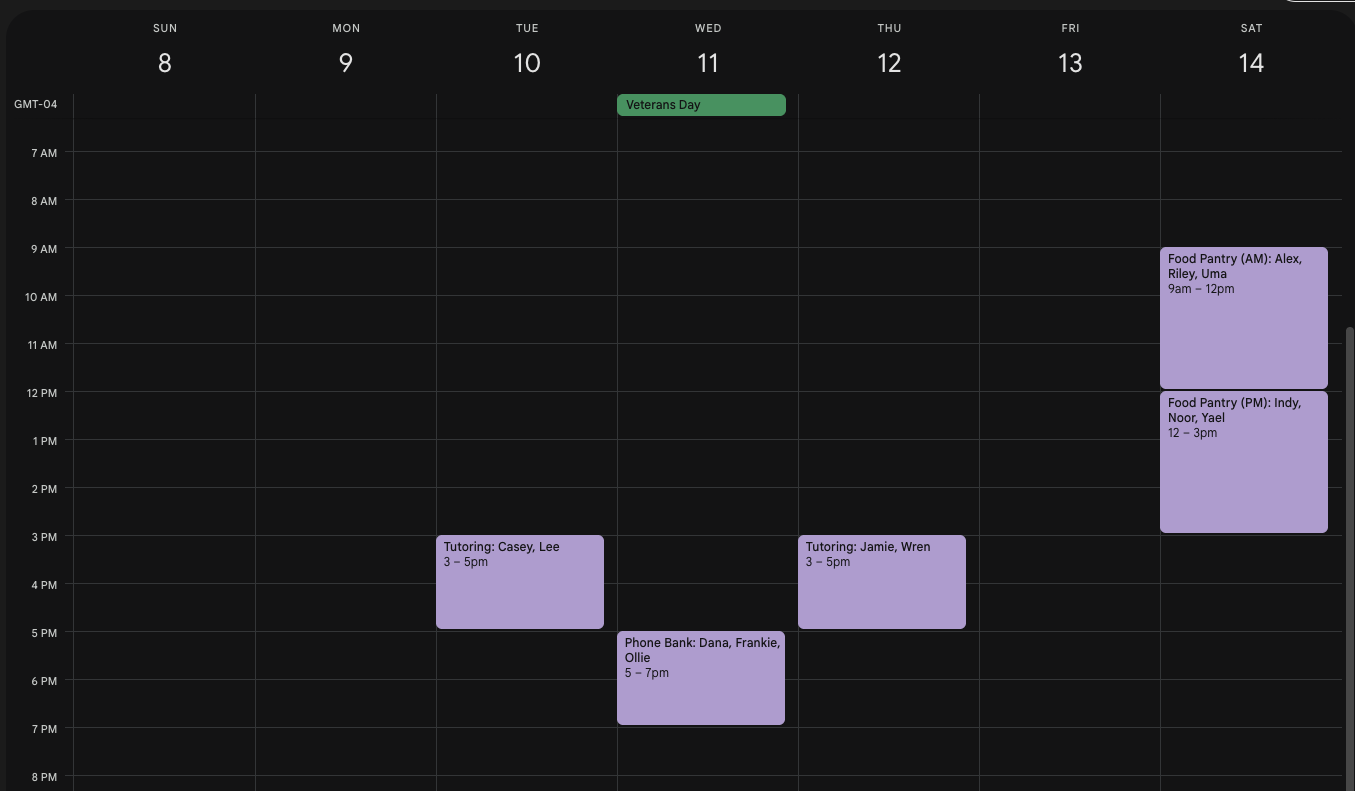
A calendar for next week.

Every shift staffed, with an experienced person where it's needed.

People get the shifts they prefer. Shifts are spread fairly.

A person checks it. The tool never contacts anyone.

7

Basically, we wanted this:

8

The ingredient

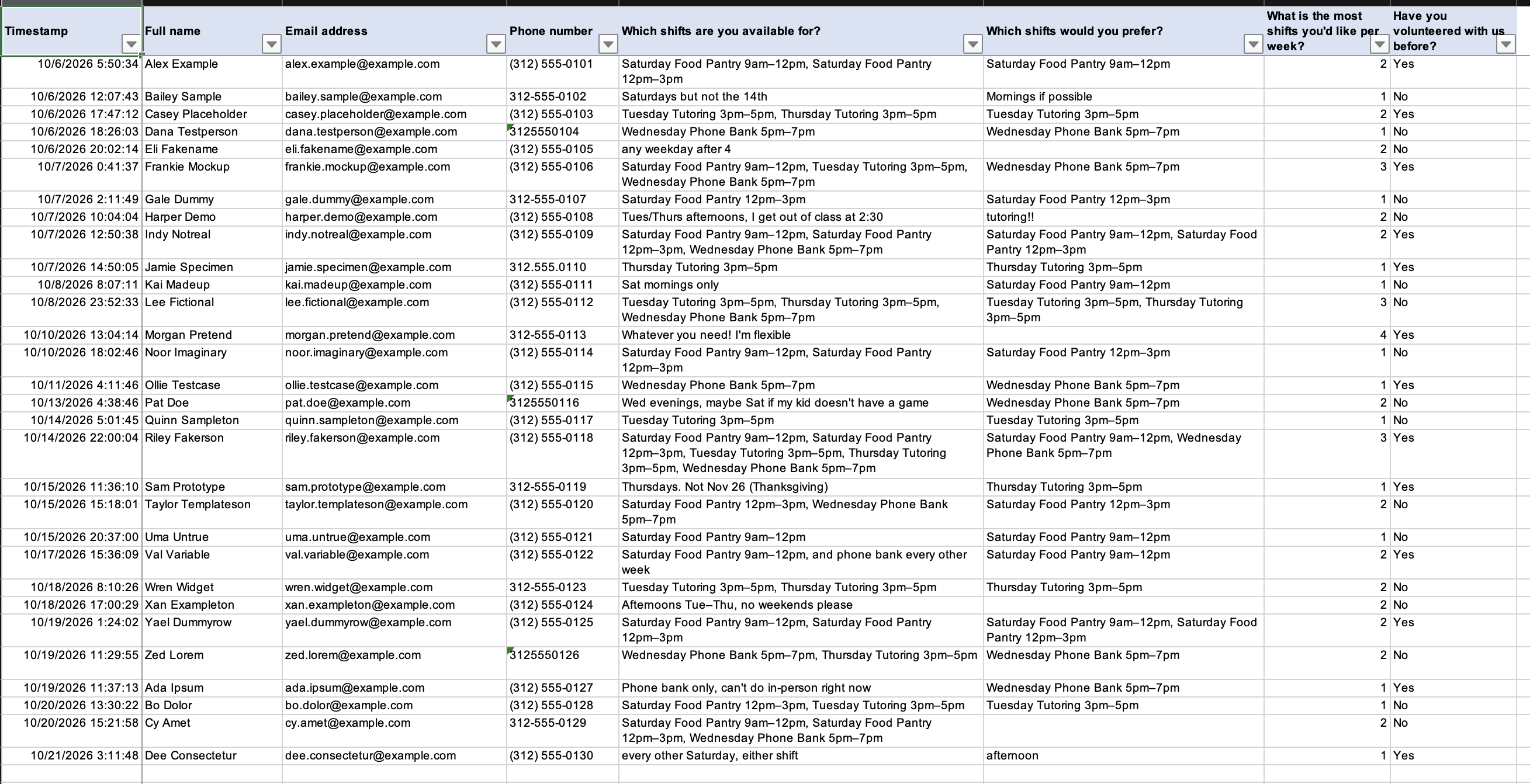
A sign-up spreadsheet, like a Google Form export.

30 volunteers. Five shifts a week.

Every single name is made up.

9

The sign-up sheet

10

You might ask

Do I need to know how to code?

No.

That's the point.

11

This is a cooking show

Here's one we made earlier.

The recipe cards are prompts: the instructions we typed to the AI. You see each card, then the dish.

Then you cook.

12

Recipe card 1: the plan

ok so: every week our volunteer coordinator takes the sign-up spreadsheet and builds a shift calendar by hand. I want a small tool that drafts the calendar, and a person checks it before anyone is told.

Don't write code yet. Write docs/BUILD_PLAN.md. The calendar should keep every shift staffed with the right number of people, including an experienced person where needed; give people their preferred shifts first; never schedule anyone outside their availability or over their limit; and spread shifts fairly. Lock the decisions: runs on my laptop, reads signups.xlsx, makes a calendar file I can import into Google Calendar plus a one-page view to check, never emails or texts anyone. Break it into phases I can build one at a time.

In plain English: make a plan first. Don't build yet. A person checks it. It never contacts anyone.

13

What came out

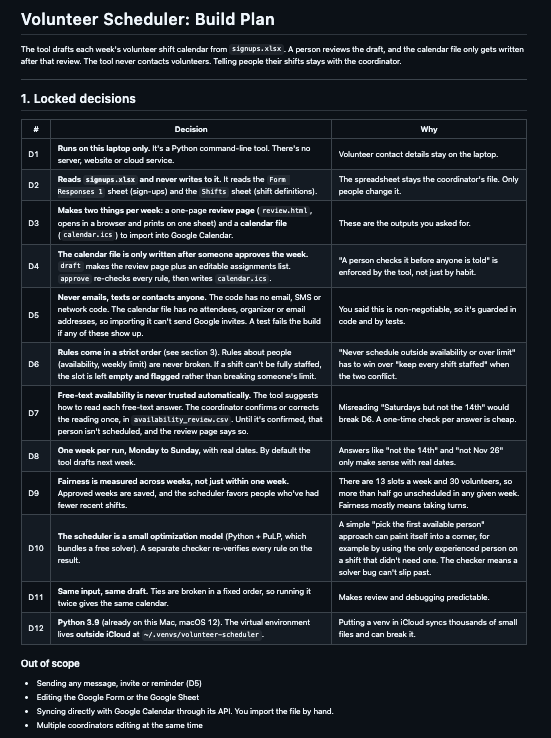
A 254-line plan, written before any code.

Twelve "locked decisions," each with a reason.

Nine steps, to build one at a time.1
  1. https://github.com/smilne3/volunteer-scheduler/blob/main/docs/BUILD_PLAN.md ↩︎

14

Recipe card 2: the build

Build Phase 0 from docs/BUILD_PLAN.md. Nothing from later phases. Tests must pass. Commit with a message that says what you did, then stop and show me.

In plain English: build step one only. Test it. Save it. Then stop and show me.

Then we said "next phase" eight more times. I took 3 meetings while Claude cooked.
15

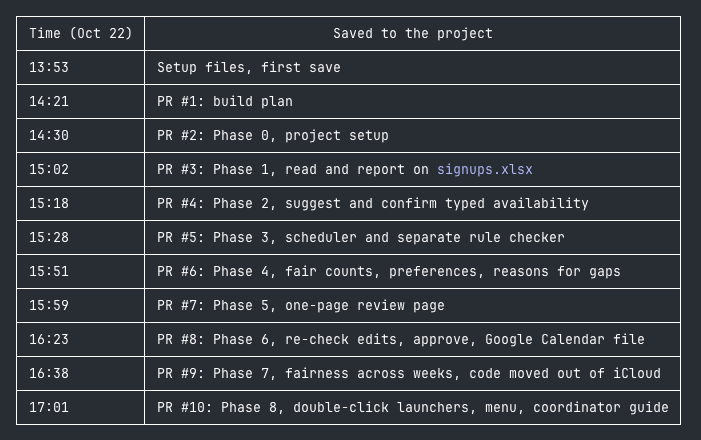
Nine steps, one afternoon

Each step saved as its own version, like MyFile-v2.doc

First save 1:53 pm. Last step 5:01 pm.

Done before dinner.
16

Recipe card 3: check its work

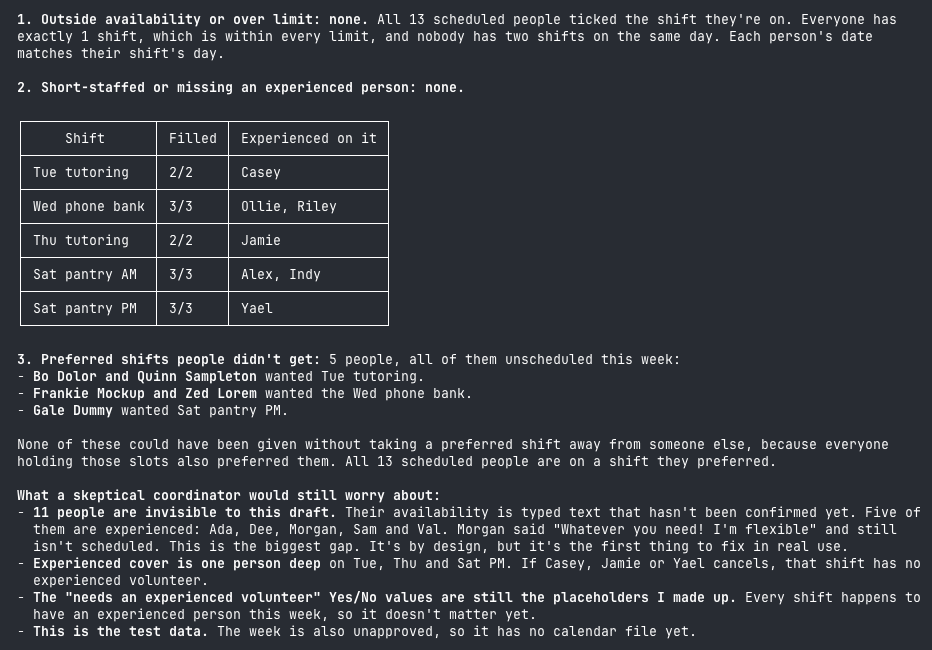
Check this week's calendar against signups.xlsx like a skeptical volunteer coordinator. List anyone scheduled outside their availability or over their limit, anyone who didn't get a preferred shift they could have had, and any shift that's short-staffed or missing an experienced person. Don't fix anything yet.

Before anyone sees it, ask the AI to check its own work like a skeptic.

No broken rules. Then it listed what a skeptical coordinator would still worry about.
17

What came out of the oven

30 sign-ups read

Every shift filled

Everyone scheduled got a shift they wanted
18

The part they edit out on TV

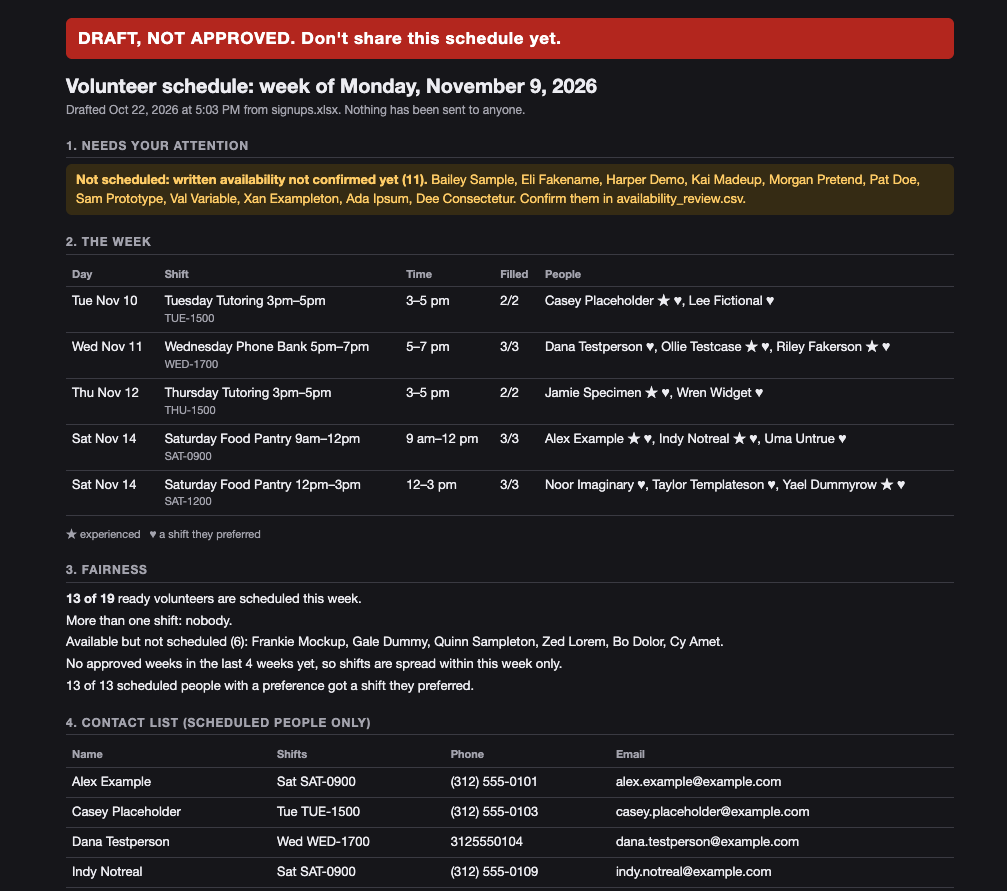
This is how you check the AI's work.

19

Burnt batch 1: the missing people

The draft looked complete. Every shift full.

It had quietly left out 11 volunteers, including five experienced ones.

Their availability was typed in their own words, and the plan said a person has to confirm those first.

The lesson: ask what it left out.

20

Burnt batch 2: the Saturday problem

Every shift had an experienced person. Most had only one.

If that one person cancels, nobody on the shift has done it before.

hmmm. I think Saturday PM sessions ... people are more likely to drop that day for personal reasons. Let's get another experienced person in case they drop.

The AI didn't know Saturdays fall apart. The coordinator did.

The lesson: you know things the spreadsheet doesn't.

21

The bill

Built with Claude Pro, a plan we already had

$0 to run: it lives on a laptop. No server, no subscription.

The finished tool doesn't use AI at all, so it can't run up a bill.

Your daily coffee run costs more.

22

Recipe card 4: the instructions

Write docs/RUNBOOK.md for the volunteer coordinator who will run this every week. Assume they have never seen the code and never will. Start with the weekly review, then what to do when the sign-up form changes.

Written for the person who runs it next week. Or after you've moved on.

23

Where the human stays

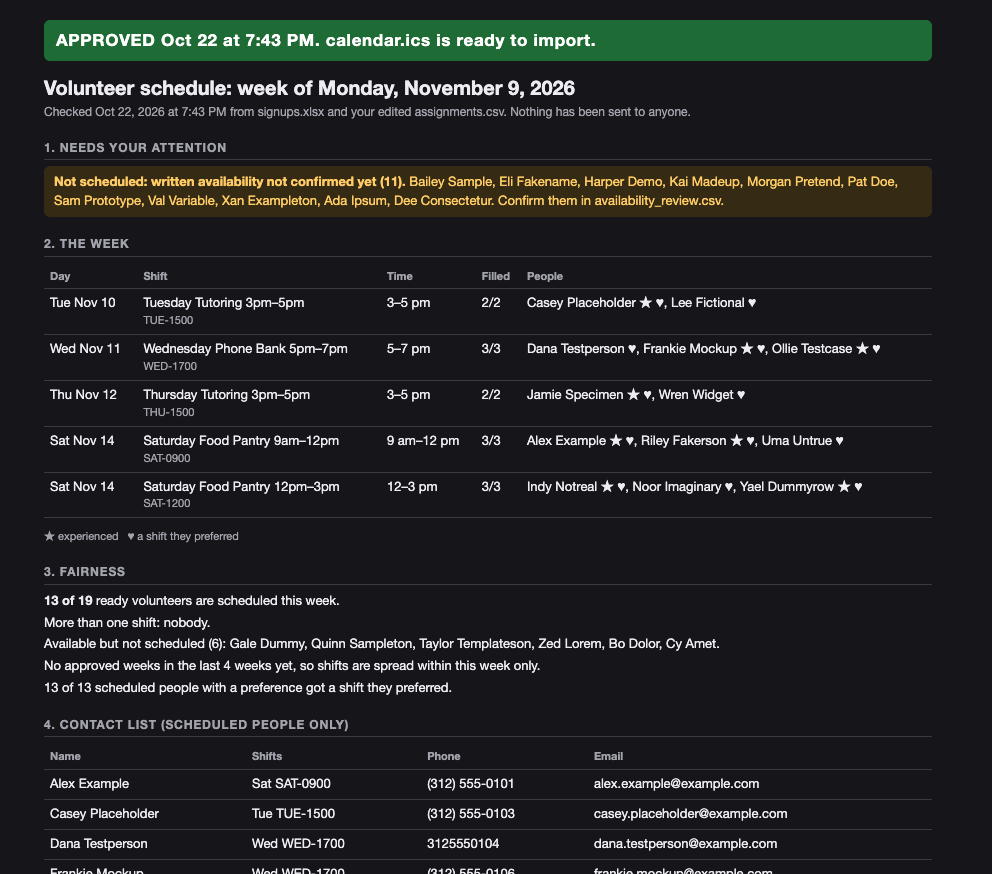
  1. Read "Needs your attention" first
  2. Confirm anyone whose availability was typed in their own words
  3. Swap anyone you want. The tool re-checks every rule.
  4. Approve. Only then does the calendar file exist.
  5. Import it, and tell volunteers yourself
24

Disclose twice

In the tool's save history, for whoever maintains it

At the bottom of every schedule, for whoever reads it

Add a line at the bottom of every schedule saying it was drafted with AI from the sign-up form and checked by staff.
25

The checklist ✅

  1. Pick a task that repeats, uses information organized the same way every time, and has a result that looks the same each time. If not, write a checklist instead.
  2. Plan first. Lock the decisions. Write down what you're NOT building yet.
  3. One source. Add the second when the first is boring.
  4. Build with made-up data. Keep real personal information on your own computer.
  5. Ask the AI to check its own work, like a skeptic.
  6. Ask what it left out.
  7. Add what you know that the spreadsheet doesn't.
  8. Write the instructions for the next person.
  9. Decide where a person checks it, and make the tool stop there.
  10. Tell people AI helped. Twice.


    (Hint: This is the slide to take a photo of.)
26

Good fits at a nonprofit

  • A weekly list of new grant opportunities from funder websites
  • This month's program numbers, dropped into the same board-report table
  • A monthly check of your website for broken links
  • News coverage of your issue, gathered and summarized
Not a good fit: one-time judgment calls, or anything no one will check.
27

What can the AI see?

🟢 Public: your website, funder pages, published reports. Go ahead.

🟡 Internal: budgets, drafts, totals with no names. Check your organization's AI policy first.

🔴 Personal: donor, client or other personal information. Keep it out.

Rule of thumb: anything the AI reads leaves your building.
28

What's on your list?

Shout out a task you do every week or month.

We'll check it against the four questions.

Then we pick one and build it together, live.

29

Your idea, live

The room's task, built from scratch.

Same recipe: plan first, build one step, check its work.

30

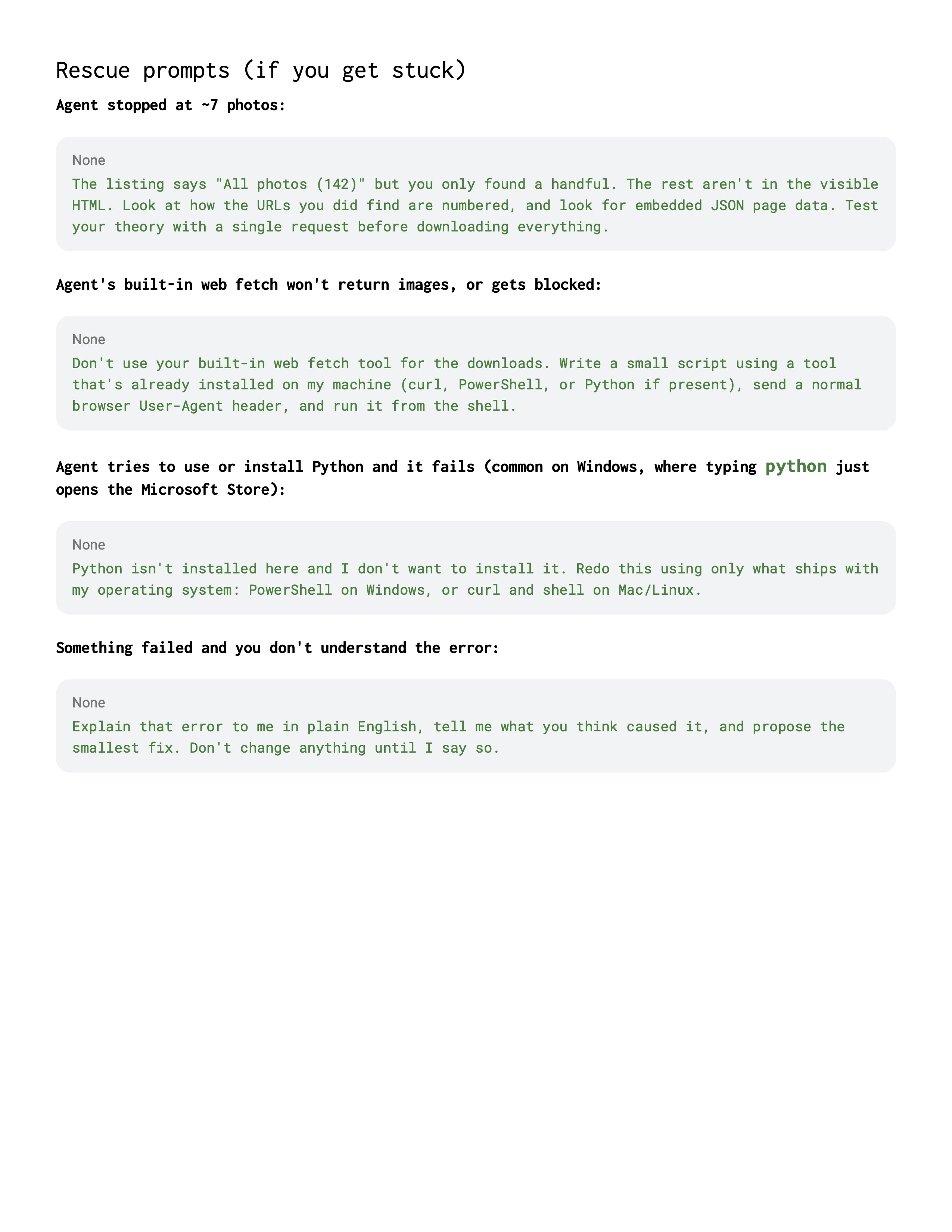
Now you cook (today or at home)

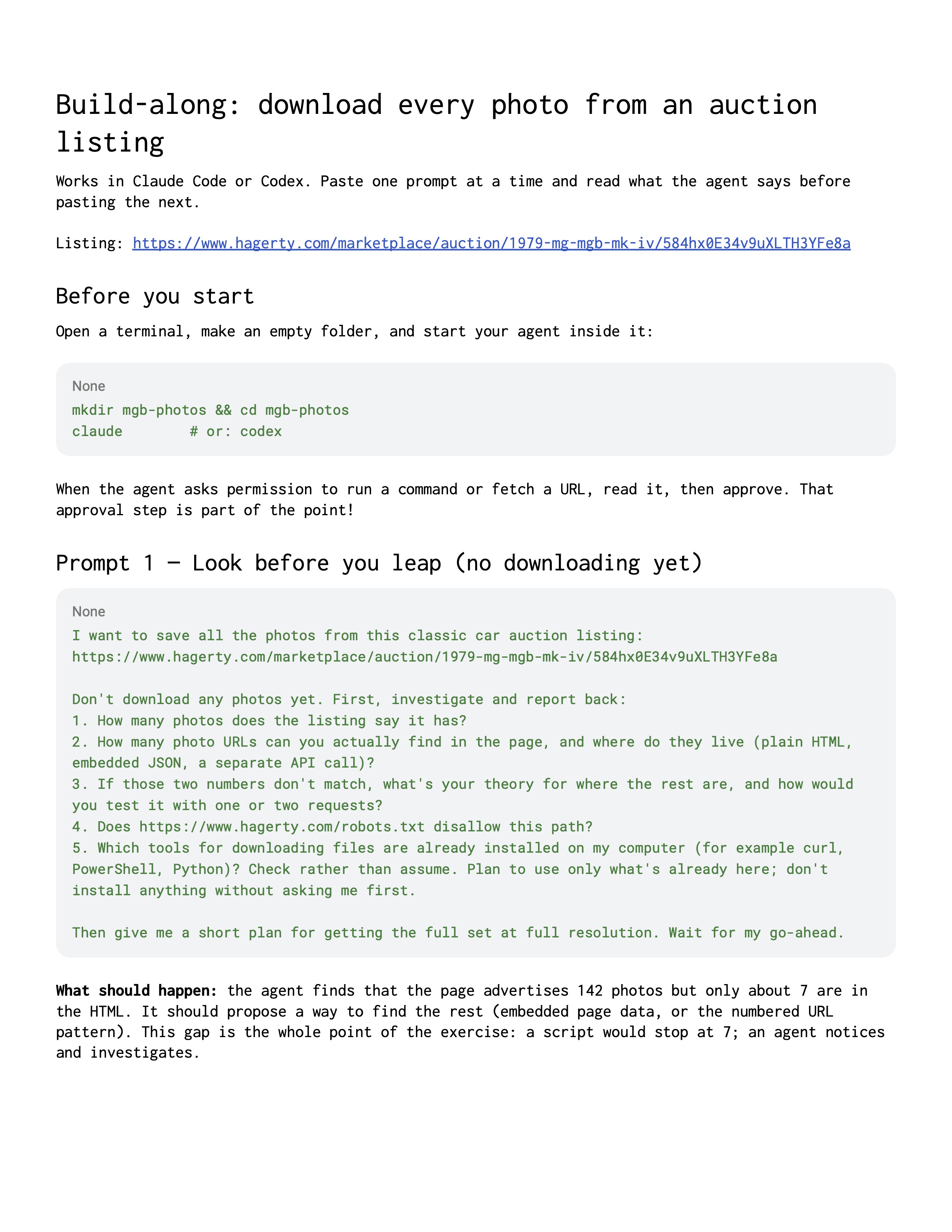
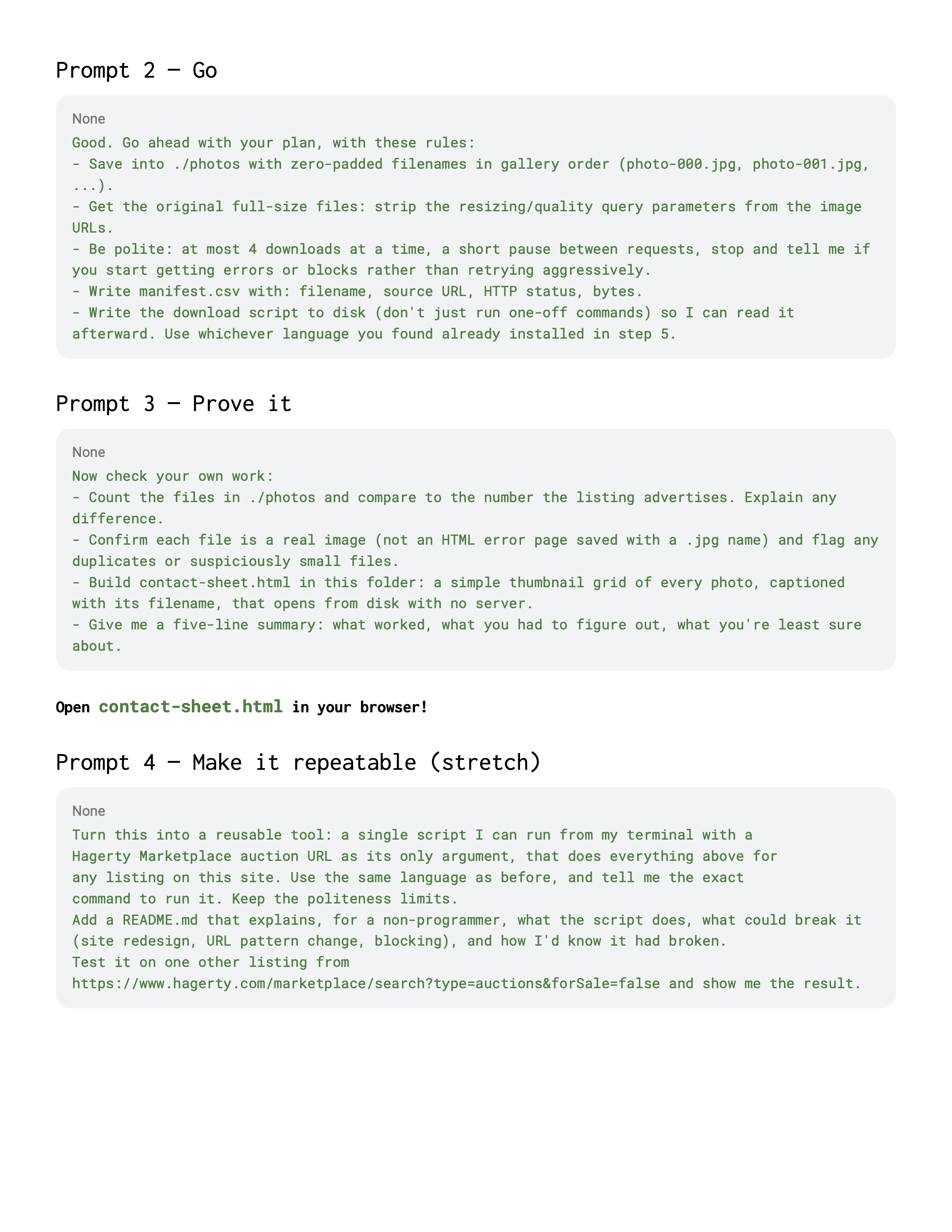
A classic car auction listing.

It says it has 142 photos. Only seven show up on the page.

Your helper's first job is to notice.

No time today? It's your homework. Prompts: tinyurl.com/npi-prompts
31
32

Your turn on Monday

  1. Pick one task you do every week or month.
  2. Ask: Does it repeat? Is the information organized the same way each time? Does the result look the same each time? Will a person check it?
  3. Check its color: green (public), yellow (internal) or red (personal). Red stays out.
  4. Then start with: "Don't build anything yet. Help me plan this."
33

Questions?

Thank you!

My Inbox is Yours 📨

ag@workingpaper.co

workingpaper.co/presentations/build-your-own-agent

See the plan and the code: tinyurl.com/npi-volunteer-scheduler

34